拉近或分開:用親密性原則,讓版面一目了然
拉近或分開:用親密性原則,讓版面一目了然
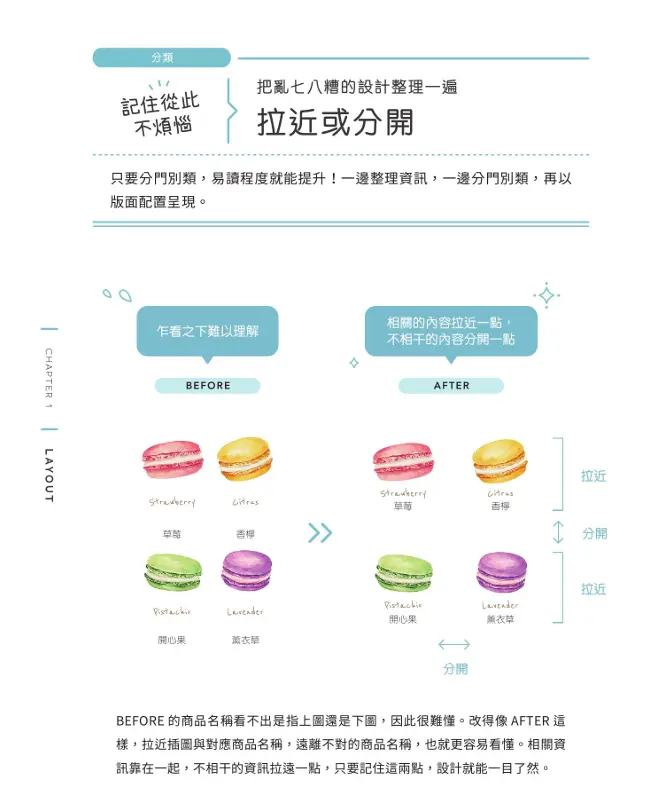
只要分門別類,易讀程度就能提升!一邊整理資訊,一邊分門別類,再以版面配置呈現。
為什麼要「拉近或分開」?
這是格式塔(Gestalt)的親密性原則(Proximity):
- 相關的內容拉近一點 → 大腦自動把它們讀成「同一組」。
- 不相干的內容分開一點 → 自然產生分界,不需要額外的線框或顏色。
上圖的 BEFORE 裡,品名(Strawberry、Citrus…)和馬卡龍的距離都一樣遠, 你會看不出哪個名字配哪個。AFTER 把插圖與對應品名拉近、遠離不對的名稱, 再把相關的兩兩一組、不相關的拉開——版面瞬間清楚。
下面用同一個馬卡龍卡片,分別做出 Vanilla / Vue / React 三種版本。 切換 BEFORE / AFTER,觀察「間距」如何改變可讀性。
互動示範(Vanilla,直接在頁面跑)
三種版本的程式碼
關鍵都一樣:資料只有一份,差別只在 gap(間距)。
親密性不是加東西,而是「調整留白」。
1. Vanilla(HTML + CSS + JS)
<div class="macaron-grid" data-mode="after">
  <!-- group 0 -->
  <div class="group">
    <figure><span class="dot" style="--c:#f7a8b8"></span>
      <figcaption><i>Strawberry</i><small>草莓</small></figcaption></figure>
    <figure><span class="dot" style="--c:#f5d76e"></span>
      <figcaption><i>Citrus</i><small>香檬</small></figcaption></figure>
  </div>
  <!-- group 1 -->
  <div class="group">
    <figure><span class="dot" style="--c:#a8d08d"></span>
      <figcaption><i>Pistachio</i><small>開心果</small></figcaption></figure>
    <figure><span class="dot" style="--c:#c3a6d8"></span>
      <figcaption><i>Lavender</i><small>薰衣草</small></figcaption></figure>
  </div>
</div>

<style>
  /* AFTER:品名拉近插圖、相關兩兩成組 */
  .macaron-grid { display:flex; justify-content:center; gap:48px; }
  .group        { display:flex; gap:20px; }
  figure        { margin:0; text-align:center; }
  .dot          { display:block; width:64px; height:44px;
                  border-radius:999px; background:var(--c); margin:0 auto; }
  figcaption    { margin-top:6px; }      /* 拉近:留白變小 */
  figcaption i  { font-style:italic; color:#666; }
  figcaption small { display:block; font-size:14px; color:#999; }

  /* BEFORE:全部均勻散開,名字離插圖一樣遠 */
  .macaron-grid[data-mode="before"]            { gap:20px; }
  .macaron-grid[data-mode="before"] .group     { gap:20px; }
  .macaron-grid[data-mode="before"] figcaption { margin-top:28px; } /* 分開 */
</style>
2. Vue 3(<script setup>)
<script setup>
import { ref, computed } from 'vue'

const after = ref(true)
const macarons = [
  { name: 'Strawberry', flavor: '草莓',   color: '#f7a8b8', group: 0 },
  { name: 'Citrus',     flavor: '香檬',   color: '#f5d76e', group: 0 },
  { name: 'Pistachio',  flavor: '開心果', color: '#a8d08d', group: 1 },
  { name: 'Lavender',   flavor: '薰衣草', color: '#c3a6d8', group: 1 },
]
// AFTER 才分組;BEFORE 全部攤在同一組
const groups = computed(() =>
  after.value
    ? [0, 1].map(g => macarons.filter(m => m.group === g))
    : [macarons]
)
</script>

<template>
  <button @click="after = !after"></button>

  <div class="macaron-grid" :style="{ gap: after ? '48px' : '20px' }">
    <div class="group" v-for="(group, i) in groups" :key="i">
      <figure v-for="m in group" :key="m.name">
        <span class="dot" :style="{ background: m.color }"></span>
        <figcaption :style="{ marginTop: after ? '6px' : '28px' }">
          <i></i><small></small>
        </figcaption>
      </figure>
    </div>
  </div>
</template>

<style scoped>
.macaron-grid { display:flex; justify-content:center; }
.group        { display:flex; gap:20px; }
figure        { margin:0; text-align:center; }
.dot          { display:block; width:64px; height:44px;
                border-radius:999px; margin:0 auto; }
figcaption i  { font-style:italic; color:#666; }
figcaption small { display:block; font-size:14px; color:#999; }
</style>
3. React(function component + hooks)
import { useState } from 'react'

const macarons = [
  { name: 'Strawberry', flavor: '草莓',   color: '#f7a8b8', group: 0 },
  { name: 'Citrus',     flavor: '香檬',   color: '#f5d76e', group: 0 },
  { name: 'Pistachio',  flavor: '開心果', color: '#a8d08d', group: 1 },
  { name: 'Lavender',   flavor: '薰衣草', color: '#c3a6d8', group: 1 },
]

export default function MacaronGrid() {
  const [after, setAfter] = useState(true)

  // AFTER 才分組;BEFORE 全部攤在同一組
  const groups = after
    ? [0, 1].map(g => macarons.filter(m => m.group === g))
    : [macarons]

  return (
    <>
      <button onClick={() => setAfter(a => !a)}>{after ? 'AFTER' : 'BEFORE'}</button>

      <div style=>
        {groups.map((group, i) => (
          <div key={i} style=>
            {group.map(m => (
              <figure key={m.name} style=>
                <span style= />
                <figcaption style=>
                  <i style=>{m.name}</i>
                  <small style=>
                    {m.flavor}
                  </small>
                </figcaption>
              </figure>
            ))}
          </div>
        ))}
      </div>
    </>
  )
}
重點整理
| 狀態 | 品名與插圖的間距 | 群組之間的間距 | 結果 |
|---|---|---|---|
| BEFORE | 一樣遠(28px) | 均勻平鋪 | 看不出歸屬 |
| AFTER | 拉近(6px) | 相關成組、拉開(48px) | 一目了然 |
一句話: 親密性靠的不是裝飾,而是「該近的近、該遠的遠」。 三種框架寫法不同,但邏輯一致——資料一份,間距決定意義。